Video Meeting - Meeting
- 4.2
- Rating
- 10.00K
- Installs
- Free
- Price

 Analysis by App-foxy
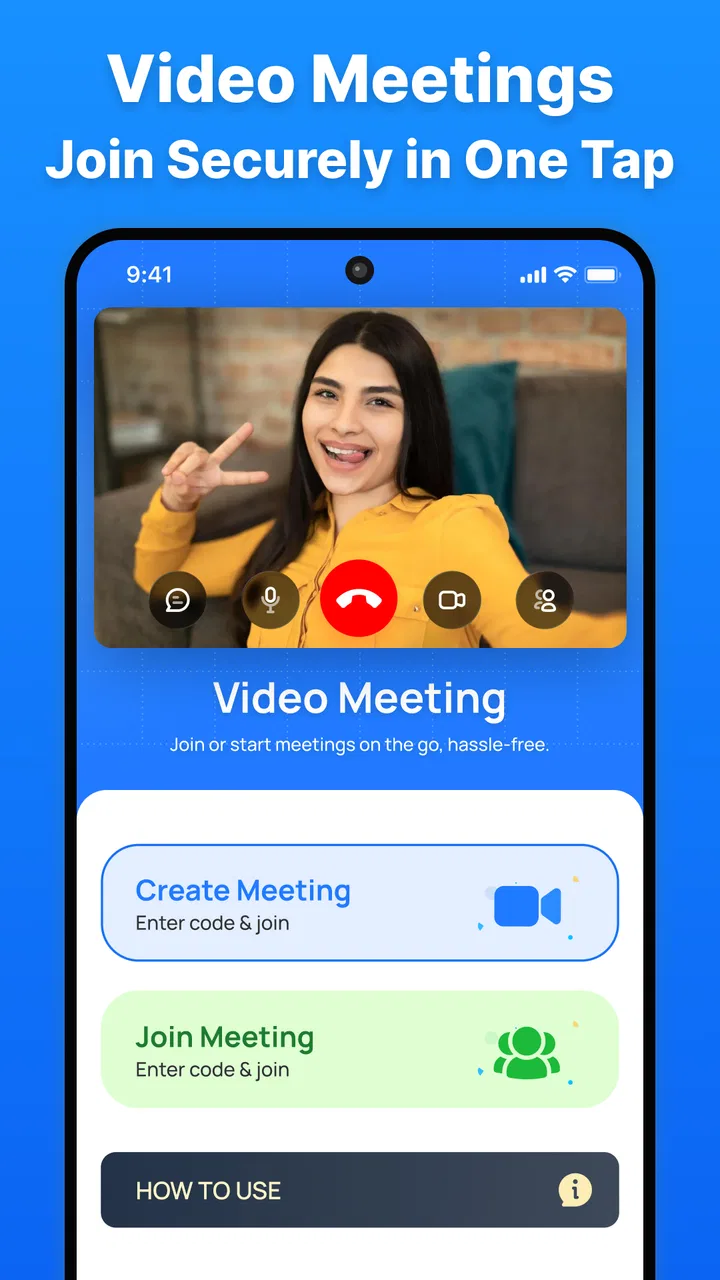
I approached Video Meeting - Meeting as a practical communication app rather than as another service competing for attention on my phone. Its purpose is straightforward: help people join video conversations for work, study, family catch-ups, or one-to-one calls. That simplicity is useful, especially when I want to start a meeting without building a complicated workflow around it. The app is developed by Innometrics Enterprise, belongs to the communication category, and is free to use.
After spending time with it, my impression is that the strongest appeal is its uncomplicated focus. The store summary highlights secure video meetings, HD calls, team conversations, and one-to-one use without time limits. Those are meaningful promises for anyone tired of sessions ending at an inconvenient moment, but they do not automatically make it the best choice for every group. The real question is whether you need a clean meeting tool or a full collaboration platform with calendars, recordings, file sharing, chat history, and administrative controls.
How Video Meeting - Meeting feels in everyday use
The current version is 1.1.6, and that detail matters because this is still a relatively young product. It was released on October 17, 2025, so I would judge it primarily by what it does today rather than by assumptions about where it might go. The app has reached over ten thousand installs and holds a 4.2 average from forty-eight ratings, with five written reviews. That gives it some early user visibility, although it is not the same level of long-term community evidence available for the biggest meeting platforms.
You May Also Like

 AccuWeather: Weather Radar
AccuWeather Review: A Quick, Clear Forecast for Everyday Decisions
For everyday plans, the best forecast is the one you can understand quickly. AccuWeather makes rain timing, radar, and local conditions easy to act on, with a few trade-offs.

 Hill Climb Racing
Why Hill Climb Racing Still Turns Crashes Into One More Run
A tiny car, a bumpy hill and one more upgrade: Hill Climb Racing keeps resurfacing because its simple chaos makes every near-miss feel personal.

 AliExpress - Shopping App
AliExpress Makes Global Shopping Feel Personal, but Shoppers Bear the Risk
AliExpress turns a global marketplace into a pocket-sized discovery engine. Its reach is useful, its shopping loop compelling, and its trade-offs easy to miss.

 Lords Mobile: Kingdom Wars
Lords Mobile Is a Kingdom-Building Routine, Not a Quick Match
A case-by-case verdict on the building, battles, device demands, and social commitments that make Lords Mobile rewarding for some players and exhausting for others.

 PDF Scanner app - TapScanner
TapScanner Makes Paperwork Easier to Capture, Check, and Share
TapScanner makes scanning with a phone feel less like a rescue operation and more like a dependable step in getting work done. Its capture tools are useful, though not flawless.

 Block Blast!
 Shows How Much a Puzzle Game Can Leave Out
A quiet grid game shows why puzzle players increasingly value instant clarity, repeatable skill and low-pressure play—and where the genre still needs to catch up.
More From Our News Desk
View All News


Starting with a video meeting feels most appropriate when the goal is immediate conversation. I can imagine using it for a quick discussion with a remote colleague, a short tutoring session, or a call with a relative who does not need a large collection of extra tools. The emphasis on both team and one-to-one calls gives it a wider range than an app designed only for personal video chat, while its communication-first design avoids turning a simple call into a project-management exercise.
The first useful habit is to treat the app as a meeting room, not as the place where the entire project lives. Before opening a session, I would decide where the agenda, files, and follow-up notes will be kept. This small step prevents a common problem with lightweight meeting apps: the conversation is easy, but the information around it becomes scattered. Video Meeting - Meeting can serve as the live discussion layer while another familiar tool handles documents and tasks.
For one-to-one calls, that trade-off is barely noticeable. A personal conversation rarely needs attendance management or a searchable archive of messages. For a small team, however, I would want everyone to agree on a consistent routine: share the meeting purpose in advance, keep the relevant document open elsewhere, and write decisions down immediately afterward. That workflow makes the app more useful without pretending it replaces every other communication tool.
Where the no-time-limit approach helps
The absence of a time limit is one of the clearest practical advantages. It removes the pressure of watching the clock during a lesson, interview, support session, or family call. I especially value that for conversations where the useful ending is determined by the people involved rather than by a countdown. A group can finish naturally instead of rushing through the last point or creating a second meeting.
There is also a quieter benefit: fewer interruptions can make a meeting feel less artificial. If a volunteer group is solving a problem, or a student needs extra explanation, the host does not have to decide whether the remaining minutes justify starting again. That does not mean every meeting should be long. In fact, I would still set an internal end time, because unlimited availability can encourage unfocused conversations. The feature removes an external restriction; it does not replace good moderation.
For professionals, the value depends on the size and formality of the meeting. A small independent team may appreciate a free option for regular calls. A larger organization may need more than duration freedom, such as centralized administration, corporate identity controls, compliance documentation, or detailed reporting. Those needs are not solved simply by allowing a call to continue, so I would test the app with a low-risk group before making it part of a larger company routine.
HD calls are useful, but the connection still matters
The focus on HD video suggests that image quality is an important part of the experience. In practice, a high-quality call is only as reliable as the phone, camera, microphone, lighting, and network behind it. I would not judge the app solely by how sharp a picture looks in ideal conditions. A meeting tool earns trust when it remains understandable and usable when someone joins from a less-than-perfect environment.
For the best result, I would test a call from the exact place where I expect to use it. A home office with stable Wi-Fi can give a very different impression from a kitchen, classroom, or mobile connection. Facing a light source rather than sitting with a bright window behind me also makes a noticeable difference to the other participants. These are ordinary adjustments, but they prevent users from blaming the app for problems caused by the surroundings.
On a phone, I would also avoid treating HD as a reason to leave video running unnecessarily. Video can be more demanding than audio, particularly during a long group conversation. If the picture becomes unstable, switching attention toward clear audio and a calmer connection is often more useful than insisting on the highest visual quality. The app’s promise is attractive, but sensible call habits still matter.
A realistic scenario: the small consulting session
Imagine a freelance consultant working with three clients on a project that does not justify a large enterprise subscription. The consultant can use Video Meeting - Meeting for a weekly conversation, keep the working document in a separate app, and send a brief written summary after each call. The lack of a time limit means a complicated review can continue without an abrupt cutoff, while the one-to-one option remains suitable for private follow-ups.
In that scenario, I would create a repeatable checklist. Before the call, I would prepare the document and write two or three decisions that need to be made. During the meeting, I would nominate one person to track actions in the external document. At the end, I would confirm responsibilities aloud and send the summary through the team’s normal channel. This is a non-obvious but important way to get more from a focused video app: use its simplicity to keep the live conversation clean, while deliberately adding structure around it.
I would not use the same setup for a large public event or a highly regulated organization without careful evaluation. The app may be perfectly comfortable for a small discussion, but a different platform could be better when registration, audience moderation, detailed host permissions, recordings, or formal audit requirements are central to the job. Choosing a smaller tool is wise only when the meeting itself is the main requirement.
What the current release tells existing users
Version 1.1.6 gives existing users a clear reason to keep the app updated, particularly because newer communication apps can change quickly as their early releases mature. I see the version as evidence of ongoing product movement, not as proof that every advanced need has already been addressed. An update number alone cannot tell me whether a specific feature has changed, so I would focus on whether the current build behaves reliably on my own device and with the people I actually call.
For someone already using it, the sensible approach is gradual adoption. Keep the app for the meetings it already handles well, then try a slightly more demanding session before moving an important recurring meeting entirely. This is especially relevant for teams that depend on a predictable routine. A short test with the intended host and participants can reveal practical friction around joining, camera use, audio, or the group’s preferred way of sharing information.
Existing users should also think about continuity. If a meeting is important, keep the invitation details and follow-up notes in a separate place rather than relying on memory or on a single app. That is not a criticism unique to this product; it is a good safeguard for any communication service. Video Meeting - Meeting works best when it is one dependable part of a broader routine, not the only place where the meeting’s purpose and outcome exist.
The free price makes experimentation easier. I can try it with a friend, a small team, or a study partner without committing money before understanding whether the experience fits. That lowers the barrier for occasional callers. It also means I would be realistic about support and advanced organizational expectations: a free app can be excellent for direct communication while still being less suitable as the central system for a large institution.
Who should choose it, and who should skip it
I would recommend this app first to people who want a focused video conversation tool. It is a sensible candidate for independent workers, small groups, students, families, and anyone who values calls that are not constrained by a session timer. The Everyone content rating also makes it approachable for a broad audience, although adults should still help less technical relatives with the first setup and meeting routine.
It may also suit teams that already have a separate system for files and written communication. In that arrangement, the app does not need to be everything. Its job is to make the live discussion available, while the team’s existing tools preserve documents, decisions, and tasks. That separation can actually be cleaner than forcing every function into one crowded platform.
I would skip it if your main requirement is a complete workplace suite. If your daily meetings depend on sophisticated scheduling, extensive participant controls, searchable records, integrated documents, or formal organization-wide management, I would compare established alternatives before switching. I would also be cautious if your contacts are unwilling to install or learn another meeting app. The best technical option is still inconvenient when the people you need to reach are not comfortable using it.
There is a similar distinction for casual personal calls. If all your friends and relatives already use a familiar messaging service with built-in video, asking them to move for the sake of a separate meeting app may create more friction than value. Video Meeting - Meeting becomes more compelling when the call has a meeting-like purpose, when duration matters, or when a small team wants a dedicated place for live discussion.
How it compares with familiar alternatives
Compared with messaging apps that happen to include video, this app’s identity is more clearly centered on meetings. That can feel more appropriate for a planned work conversation or a study session, where participants expect to join for a defined purpose. Messaging platforms usually win on convenience because contacts, chats, and shared media are already in one place. The choice comes down to whether you value a dedicated meeting context or the lowest possible barrier to calling someone.
Compared with large conferencing platforms, Video Meeting - Meeting appears more approachable for a small group that does not need a deep ecosystem. The free, no-time-limit positioning is appealing when a team wants to talk without watching a session clock. The larger services are often the safer comparison for organizations that need mature administration and a wide collection of connected workplace functions. I would not choose based on the word “HD” alone; I would choose according to the meeting’s complexity and the consequences of failure.
Compared with one-to-one calling tools, its team orientation may make it a better fit when several people need to participate. On the other hand, a dedicated personal calling app may feel faster for spontaneous conversations with people who already use it. Video Meeting - Meeting is strongest in the middle: more structured than a casual call, but potentially less burdensome than a full corporate conference system.
Practical questions to settle before relying on it
A reader will reasonably want to know whether the app costs anything, and the answer is simple: it is free. That makes a trial with a small group easy. I would still distinguish “free to install and use” from “free of every organizational concern.” Before using it for sensitive work, I would review the app’s current behavior and the standards required by the organization, rather than assuming that a free meeting tool automatically matches a company’s policies.
Device compatibility is another useful checkpoint. The listed minimum operating system is Android 8.0, so people using older phones should check their device before planning a group call around it. Even on a supported phone, I would test camera and microphone access in advance. A meeting can fail for simple hardware or system reasons, and discovering that five minutes before an interview is much worse than discovering it during a quick practice call.
People also ask whether it is suitable for long meetings. The no-time-limit positioning makes it a reasonable option when a conversation may run beyond a short scheduled window. My advice would still be to divide a long session into clear sections and pause when attention drops. Unlimited duration is helpful for flexibility, but an unstructured call can become harder to follow as time passes.
For team use, I would ask one more question: where will the record of the meeting live? If the answer is “nowhere,” the app is being asked to solve a problem it was not designed to solve by itself. Decide in advance how to preserve actions, decisions, and shared materials. That single workflow choice can determine whether the experience feels professional or improvised.
What I would watch as the product develops
Because the app is still early in its public life, I would watch how consistently it handles the basics as its user base grows. Reliability during joining, stable audio, clear video, and a straightforward experience matter more to me than a long list of extra functions. If those foundations remain solid, the app can earn a place among lightweight meeting options.
I would also watch whether future releases make the product more useful for teams without sacrificing its current directness. Improvements that reduce setup friction or clarify meeting organization would be valuable. By contrast, adding layers of complexity could weaken the reason to choose it over established conferencing suites. The best evolution would preserve the quick path to a call while giving regular users better control over their routines.
Security is another area I would treat carefully. The app’s positioning makes secure meetings an important part of its appeal, so users should pay attention to how that promise is reflected in the product’s ongoing documentation and behavior. I would not turn a general security message into a guarantee for every sensitive scenario. For ordinary conversations, the app may be a comfortable option; for confidential professional work, the organization should apply its own security review.
My final view is favorable but measured. Video Meeting - Meeting is most convincing when you need a free, focused video room without a time limit, especially for one-to-one calls and small team conversations. Its current version and early reception suggest a product worth trying, not one that should automatically replace every established service. I would install it for a low-risk meeting, test it with the people who matter, and keep a simple backup plan for important calls.
In my experience, the app’s best quality is that it leaves room for the conversation itself. It does not need to become your calendar, document cabinet, and task manager to be useful. If that focused approach matches the way you already work, it can be a practical addition to your communication setup. If you need a complete collaboration environment or your contacts resist new tools, a familiar alternative will probably be the better choice.
For readers deciding whether to try it, my recommendation is to begin with a short one-to-one call, then move to a small planned group meeting. Check the experience on the devices your participants actually use, prepare an external place for notes, and judge the app by the reliability of that complete workflow. That test will tell you more than any feature label. Innometrics Enterprise’s Video Meeting - Meeting is worth considering when simplicity, HD video, and unrestricted meeting length matter more than an extensive platform of extras.
FAQs for Video Meeting - Meeting
01What is Video Meeting - Meeting, and what can I use it for?
Video Meeting - Meeting is a communication app designed for joining or hosting online video conferences from a mobile device. It can be useful for remote work, online classes, group discussions, interviews, and personal calls. Depending on the meeting settings, participants may be able to use video, microphone, chat, and screen-sharing features during a session.
02Do I need to create an account before joining a meeting?
In many cases, users can join a meeting through an invitation link or meeting code without creating a full account, although this may depend on the host’s settings and the app’s current requirements. Some features, such as scheduling meetings, managing contacts, or hosting sessions, may require registration. Check the sign-in screen carefully before entering personal information.
03Does Video Meeting - Meeting work on both Android and iOS devices?
The app is intended for mobile users, but compatibility can vary according to the device model, operating system version, and the developer’s current release. Before downloading, check the official store listing for supported Android or iOS versions. Keeping your operating system and the application updated can also improve stability, security, and compatibility with newer meeting features.
04What permissions and internet connection does the app require?
Video Meeting - Meeting generally needs access to the camera and microphone if you want to participate with video and audio. It may also request notification or network permissions to alert you about meetings and maintain a connection. A stable Wi-Fi or mobile-data connection is strongly recommended, because weak bandwidth can cause delays, frozen video, dropped calls, or reduced call quality.
05Is Video Meeting - Meeting free, and are there any limitations?
The application may be available to download at no initial cost, but availability of advanced tools can depend on the specific version, meeting plan, or developer policy. Possible limitations may include meeting duration, participant capacity, recording, advertising, or premium features. Review the in-app pricing details and privacy information before subscribing or providing payment details.
Pros
- Simple interface makes it easy to join or start meetings.
- Supports video and audio calls for remote communication.
- Useful for team meetings
- online classes
- and personal calls.
- Meeting links can simplify invitations for participants.
- Works on mobile devices
- allowing meetings while traveling.
Cons
- Call quality may depend heavily on your internet connection.
- Some advanced meeting features may require payment.
- Background noise can affect conversations without proper controls.
- Joining meetings may require microphone and camera permissions.
- Long video calls can consume significant battery and mobile data.

Video Meeting - Meeting
Gallery